| Patch Tuesday – 1/13/2026 |
The second Tuesday of every month is Patch Tuesday, when Microsoft releases security updates addressing vulnerabilities across Windows, Office, Azure, and related products. January 2026’s Patch Tuesday occurred on Tuesday, January 13, 2026, marking Microsoft’s first major security update cycle of the year.
This month’s release addressed 114 security vulnerabilities across Microsoft’s product ecosystem, including three zero‑day vulnerabilities, one of which was confirmed as actively exploited in the wild.
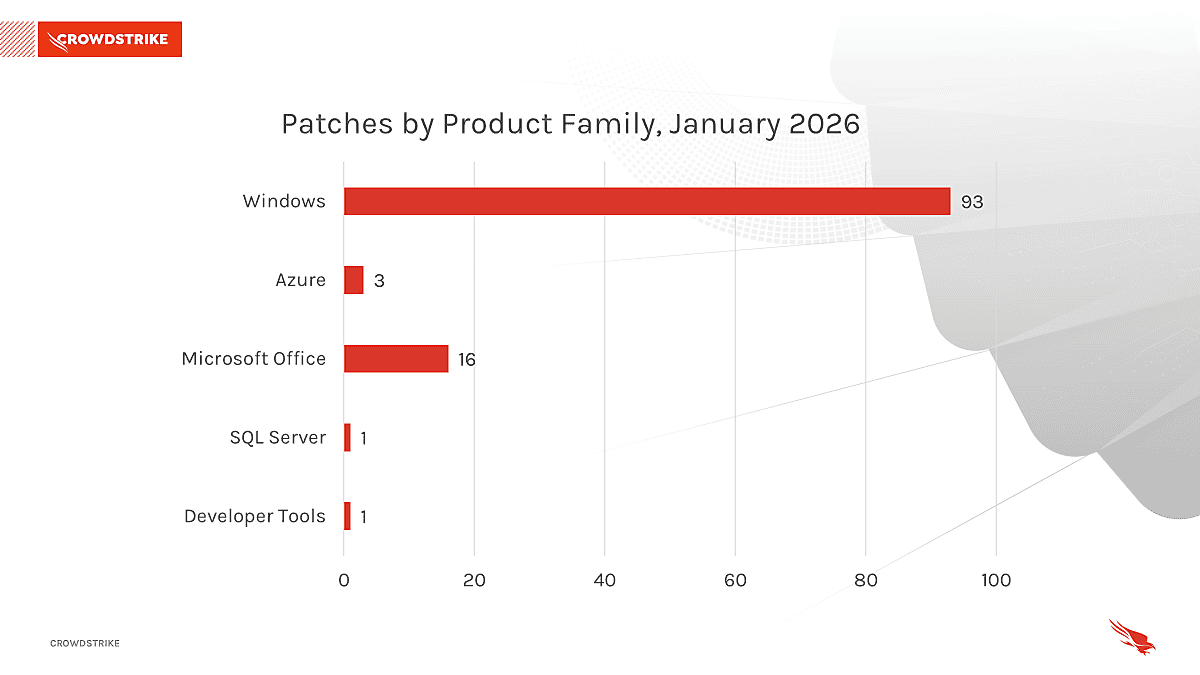
This month’s leading risk types are Execution and Elevation Of Privilege (40%) followed by Remote Code Execution (26%) and Information Disclosure (14%)
Windows products received the most patches this month with 93, followed by Microsoft Office with 16.
This month’s leading risk type is Elevation Of Privilege (50%), followed by Remote Code Execution (19%) followed by and Information Disclosure (19%)
Threat Grading Overview
Microsoft assesses threats based on the theoretical worst possible outcome were a vulnerability to be exploited. The assessment factors in how easily a vulnerability can be exploited, and what damage could be done.
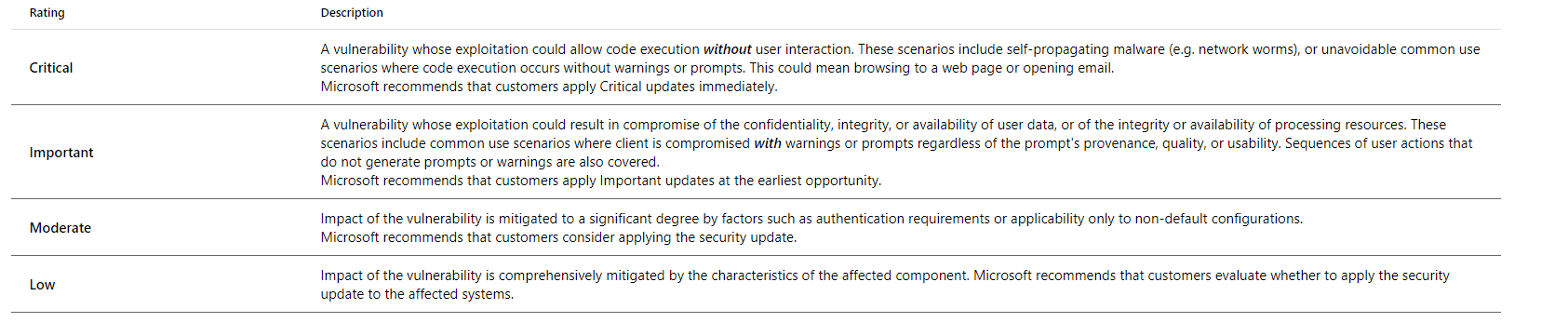
These patches included remediation for three “Zero-Day” vulnerabilities, meaning no patch was previously available. Two of these vulnerabilities have been reported as exploited in the wild.
Actively Exploited Zero‑Day Vulnerability
CVE‑2026‑20805 – Windows Desktop Window Manager Information Disclosure Vulnerability
- CVE‑2026‑20805 is an actively exploited information disclosure vulnerability affecting the Windows Desktop Window Manager (DWM).
- Successful exploitation allows a local attacker to leak sensitive memory addresses associated with the remote ALPC port.
- While the vulnerability does not directly allow code execution, it can be leveraged to bypass security protections such as Address Space Layout Randomization (ASLR), enabling attackers to chain additional exploits for full system compromise. [github.com]
Publicly Disclosed Zero‑Day Vulnerabilities
CVE‑2026‑21265 – Secure Boot Certificate Expiration Security Feature Bypass Vulnerability
- CVE‑2026‑21265 relates to the upcoming expiration of Windows Secure Boot certificates issued in 2011.
- Systems that are not updated may become vulnerable to Secure Boot bypass techniques or experience issues trusting new boot loaders later in 2026.
- Microsoft is proactively addressing this issue by deploying updated certificates through Windows Updates.
CVE‑2023‑31096 – Windows Agere Soft Modem Driver Elevation of Privilege Vulnerability
- This vulnerability affects legacy third‑party modem drivers that ship with supported versions of Windows.
- Successful exploitation could allow a local attacker to elevate privileges to SYSTEM.
- Microsoft addressed this issue by removing the vulnerable drivers from affected Windows installations as part of the January 2026 updates.
| Case Study: Transaction Callback Scam |
Throughout 2025, ACT observed a dramatic rise in “Transaction Callback” scams targeting end users via email.
In this scam, threat actors email the target with details on a transaction they were not involved in. The scammer then includes a fake callback number, intended to get the user on the phone to provide banking information. One such example can be seen below: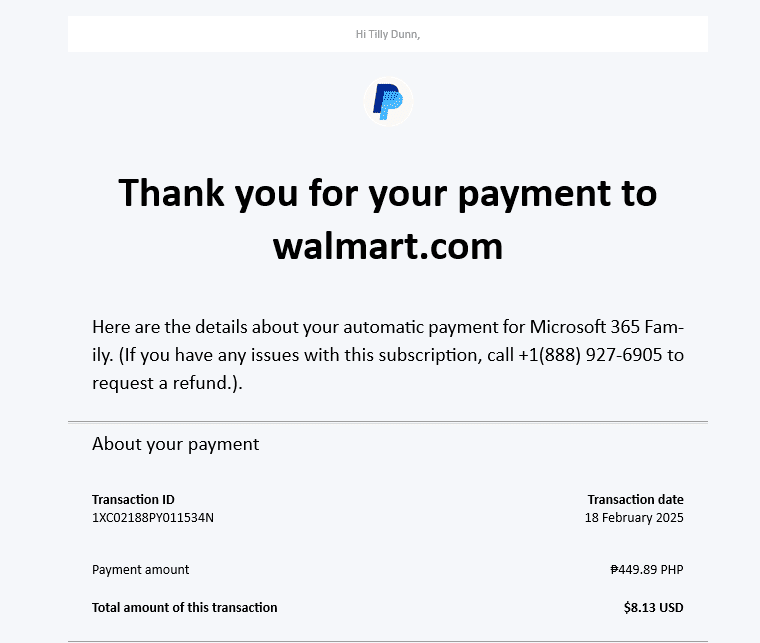
At first glance, this appears to be a legitimate transaction receipt. Most notably the email comes from Paypal.co.uk, a legitimate sender, therefore passing through most mail filters.
The real detail of the scam lies in the information below the payment title, in the transaction details: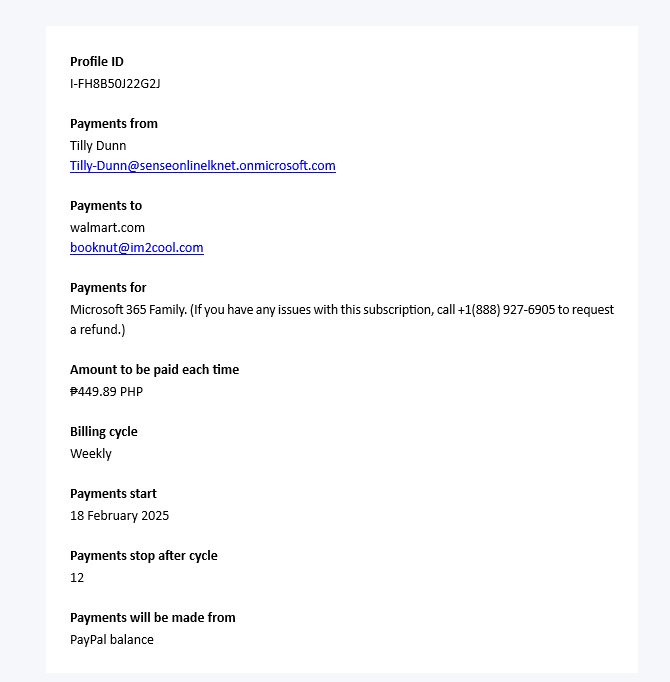
Note the ‘Payments For’ information. Here, we see some irregular text. An indication this was for a Microsoft 365 Subscription, followed by details about a number to call with any issues.
Calling this number connects the user to a call center claiming to be ‘Support’. The scammers will then ask the target to provide banking details and allow account access to ‘review the transaction’.
Below is another example of this scam, this time using a Microsoft License purchase.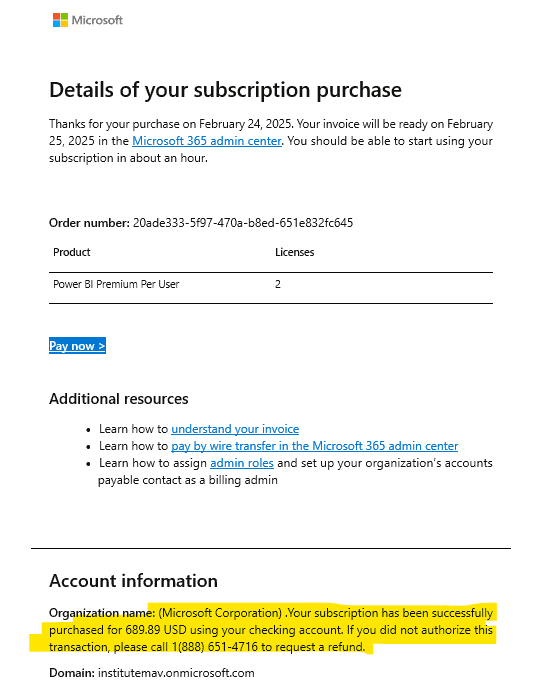
Here, the scam information has been placed in the “Organization Name” field.
In an independent review, ACT found that both of these numbers redirect to the same call center in Mumbai, India. The scammers answering phones even mistakenly identified themselves as PayPal when called on the number in the Microsoft email. After alerting them to this, the scammers hung up immediately.
In both instances, the workflow for the scam is the same:
1. Conduct a legitimate transaction through a legitimate organization (PayPal or Microsoft are by far the most common). This usually includes the threat actor sending themselves money or purchasing their own subscription to ensure the email appears legitimate and is delivered.
2. The Threat Actor elects to BCC the targeted email addresses as contacts for the transactions, delivering the legitimate receipt to the end user.
3. In the field for ‘Organization Name’ or ‘Payments For’, the threat actor enters a message with a fake number to call for subscription questions.
4. The Threat Actor completes the transaction, delivering the receipt, and the scam, to their targets.
This scam is successful for various reasons:
1. The email comes from legitimate, trusted email addresses. ([email protected], [email protected]). These are unlikely to be blocked or flagged for malicious email, making it much more likely the email is delivered.
2. The charges often detail very high transaction costs, creating a sense of urgency.
3. Receipts from PayPal and Microsoft do not usually include support numbers, so the target is likely to call the only number they see.
ADVANCED strongly advises all staff to be on the lookout for these scams and to educate their users on potential issues.
| Scam of the Quarter – Transaction Approval Fraud |
In the start of the new 2026-year, ACT observed a rise in reports of end users receiving emails requesting payment for services rendered to members of their organization’s management team.
In these cases, a threat actor constructs an email thread, crafting a conversation between the CEO and the ‘service provider’. In the thread, the CEO ‘approves’ payment for services rendered. The thread is then forwarded to your billing department, requesting payment.
In reality, no services were rendered, and the CEO is not aware of any such transaction taking place.
We will begin with a view of the entire email thread, seen below: 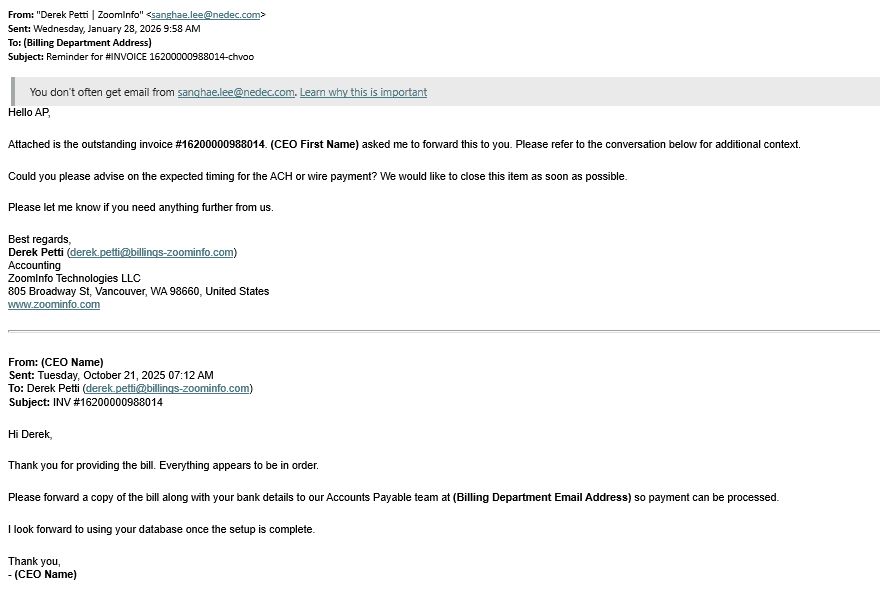
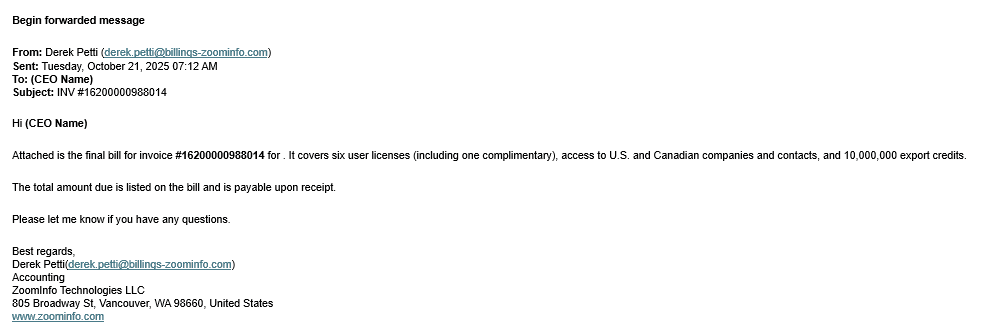
For starters, let’s focus on the most recent email of the ‘thread’ the threat actor has created. In this case study, the threat actor, [email protected], is using the display address of “Derek Petti | ZoomInfo” to appear legitimate. This can be seen in the From field below.
The target in this case is also utilizing Microsoft 365 Transport Rules , which warns the end user that they don’t often receive mail from [email protected].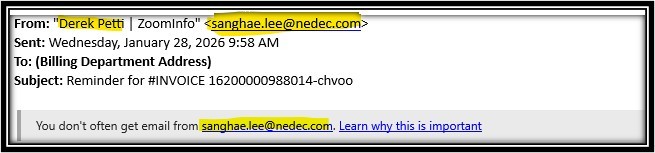
It is important to note the sender of this email is not Derek Petti from ZoomInfo. The threat actor has modified the settings of the email so the display name appears as ‘Derek Petti | ZoomInfo”. This is a very common tactic for threat actors, and is critical to the success of this scam.
You will also notice that in other emails in this thread, the From address displays [email protected] without a display name. This is because the threads of these emails can be edited to appear legitimate, thus explaining the variance: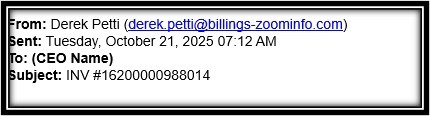
Moving on to the contents of the email, the email sent to the billing department of the targeted organization is seen below: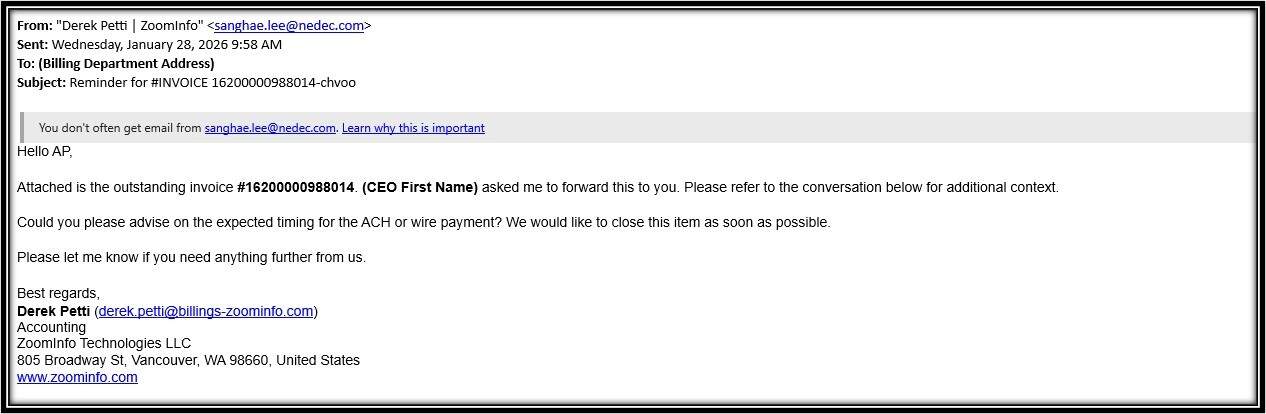
Here we can see the threat actor has advised the billing department that ‘ZoomInfo’ is awaiting payment.
This email may or may not contain a malicious attachment. The success of the scam hinges on successful email delivery, so threat actors are less likely to include attachments or malware that could get the email flagged by spam filters. The goal here is usually to deceive the end user into willingly providing payment, not to deploy malware. In this case, the attachment included instructions for wiring money to an offshore account owned by the threat actor.
The end user is also dissuaded from asking for confirmation or additional details, as ‘approval’ from the CEO has been provided earlier in the thread: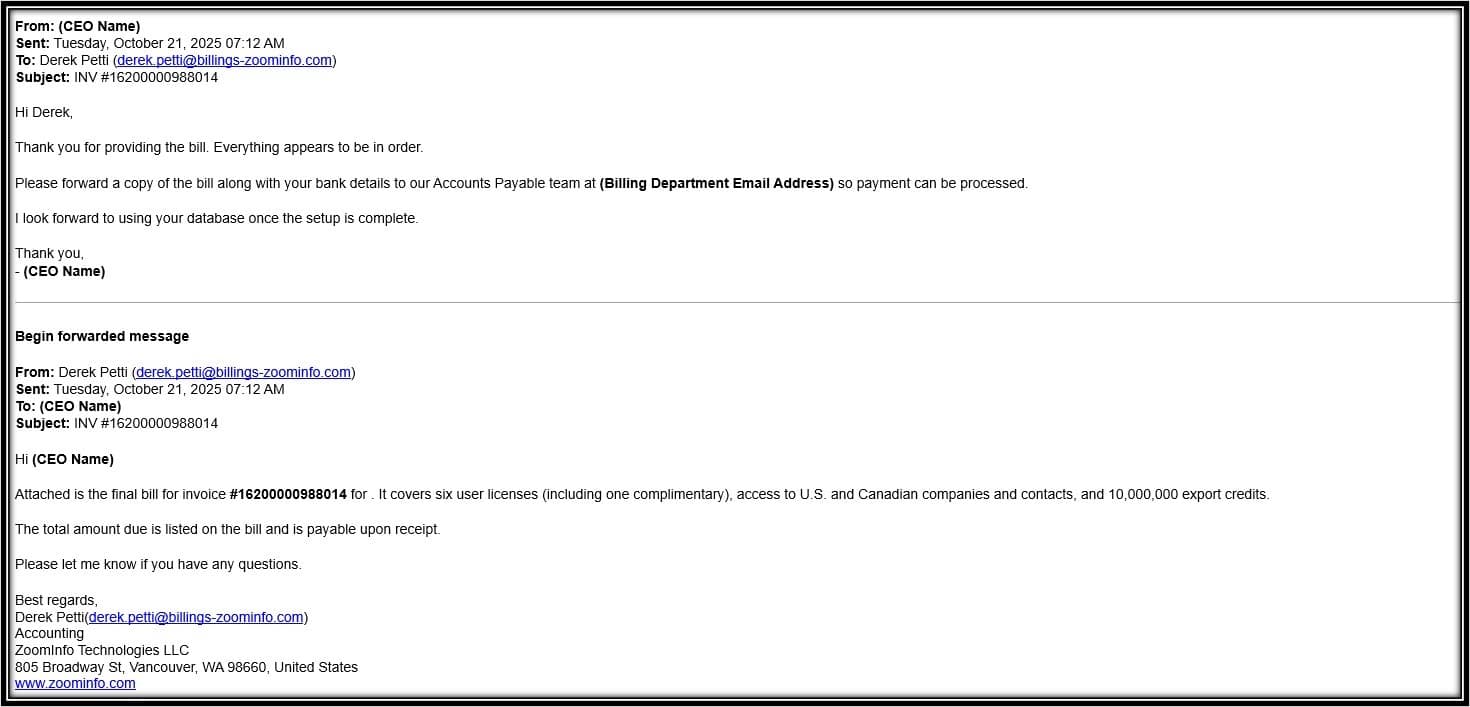
Of course, the email never went through any approval and services were never rendered. The email thread was just modified to convey a conversation that never happened.
The most important thing to note is that email threads can be edited by anyone replying to an email. The email chain can never be trusted entirely unless the recipient has been a part of the chain from the beginning.
While timely patching and strong technical controls remain essential, it is important to recognize a broader trend shaping today’s threat landscape: many modern attacks rely less on technical exploits and more on deception, impersonation, and social engineering.
Threat actors are increasingly successful not because they are highly sophisticated hackers, but because they exploit human trust, urgency, and routine business workflows. Phishing emails, callback scams, impersonation attempts, and credential harvesting attacks often bypass security tools by appearing legitimate, familiar, or time‑sensitive. In many cases, attackers do not need to defeat advanced defenses—they simply convince a user to act.
ACT strongly encourages organizations to:
- Reinforce regular security awareness training
- Promote a culture where users feel comfortable reporting suspicious emails or requests
- Remind staff that urgency and authority are common tools used by attackers
- Emphasize that no legitimate vendor or internal team should pressure users to bypass standard security procedures
Security is no longer just a technology problem—it is a shared responsibility between systems, processes, and people. Keeping users informed and engaged is a critical part of maintaining a strong security posture.
See what ADVANCED can do for your security culture by emailing us at [email protected]!
As always, Advanced is proud to be here for all your security needs. Reach out now by visiting our contact page, to determine how you can improve your security posture and keep your business running!
Regards,
The ACT Security Task Force
Sources:
https://msrc.microsoft.com/update-guide/releaseNote/2026-jan
https://www.bleepingcomputer.com/news/microsoft/microsoft-january-2026-patch-tuesday-fixes-3-zero-days-114-flaws/
https://www.crowdstrike.com/en-us/blog/patch-tuesday-analysis-january-2026/